§ 01 · PROJECT

Smart Light Switch.

A high-quality smart light switch — clamps over the wall plate, no rewiring needed.

24 GHz mmWave radar presence detection, local sleep tracking, five operating modes, a dual-arm mechanical toggle, and full Alexa + Google Home integration — all running on a single ESP32-C6.

Year2023
StatusShipped · v3
MCUESP32-C6
SensingmmWave
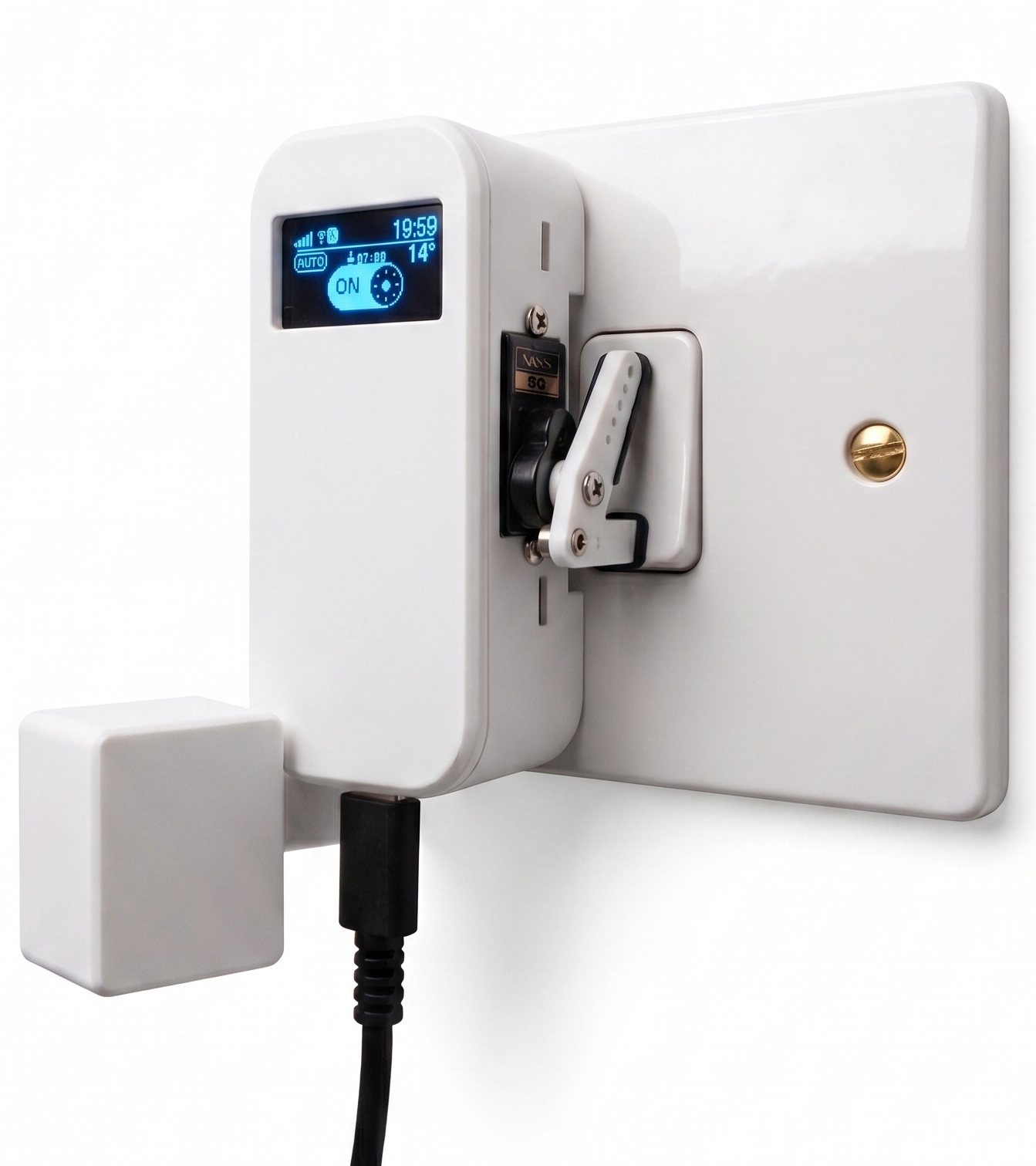
Smart light switch controller installed over a UK wall switch
FIG.01 · Smart light switch v3 installed over a UK 1-gang wall switch 128×64 OLED · SG90 servo · LD2410C radar · USB-C
§ 02 · OVERVIEW non-invasive · over-the-switch

A smart switch that touches nothing live.

This non-invasive smart light switch controller is designed to sit directly on top of a standard physical rocker switch. By using a precise micro servo to physically toggle the switch, it bypasses the need for electrical rewiring or neutral wires, making it compatible with any home wiring standard.

Operating entirely on low-voltage DC power, the device integrates advanced radar presence sensing, local sleep tracking, smart blind synchronisation over MQTT, and native smart assistant connectivity, transforming a basic physical switch into a fully integrated smart home hub.

§ 03 · SYSTEM ARCHITECTURE RISC-V · Wi-Fi 6 · BLE 5 · I²C · UART · PWM

One microcontroller. Four buses. Two networks.

All components connect to the central ESP32-C6 processor. Sensors are on the left, actuators on the right, and cloud services below.

Sensors MCU Actuators Cloud / Net Data Wireless
§ 04 · KEY FEATURES six pillars · all on-device

What's actually in the box.

01

24 GHz mmWave radar

The sensor detects stationary people by measuring subtle chest movements from breathing — solving the classic problem where lights turn off when you sit still. Features a range of up to 6.75 metres.

02

Local sleep tracking

Processes sleep habits entirely on-device. Tracks sleep consistency, duration, cycle alignment, and bedtime timings without sending any data to the cloud.

03

Central State Machine

Auto, Manual, Alarm, Bedtime, and Locked. All inputs — physical touch, MQTT commands, alarm schedules, presence detection, and safety triggers — flow through a central controller for smooth and predictable transitions.

04

Safe updates & rollback

New software updates are only saved after a successful boot and network connection. Configuration files are mirrored with checksums to prevent corruption, and failed updates automatically roll back.

05

Universal connectivity

Wi-Fi 6, simple Bluetooth setup, local MQTT support, smart assistant integration (Alexa & Google Home), weather updates, and automatic time sync.

06

Smart OLED display

Automatically turns off when the room is empty to save energy and prevent screen burn-in. A drifting screensaver displays the time and weather when idle, moving around the screen to protect the pixels.

§ 05 · INTERNAL LAYOUT PETG · Fusion 360

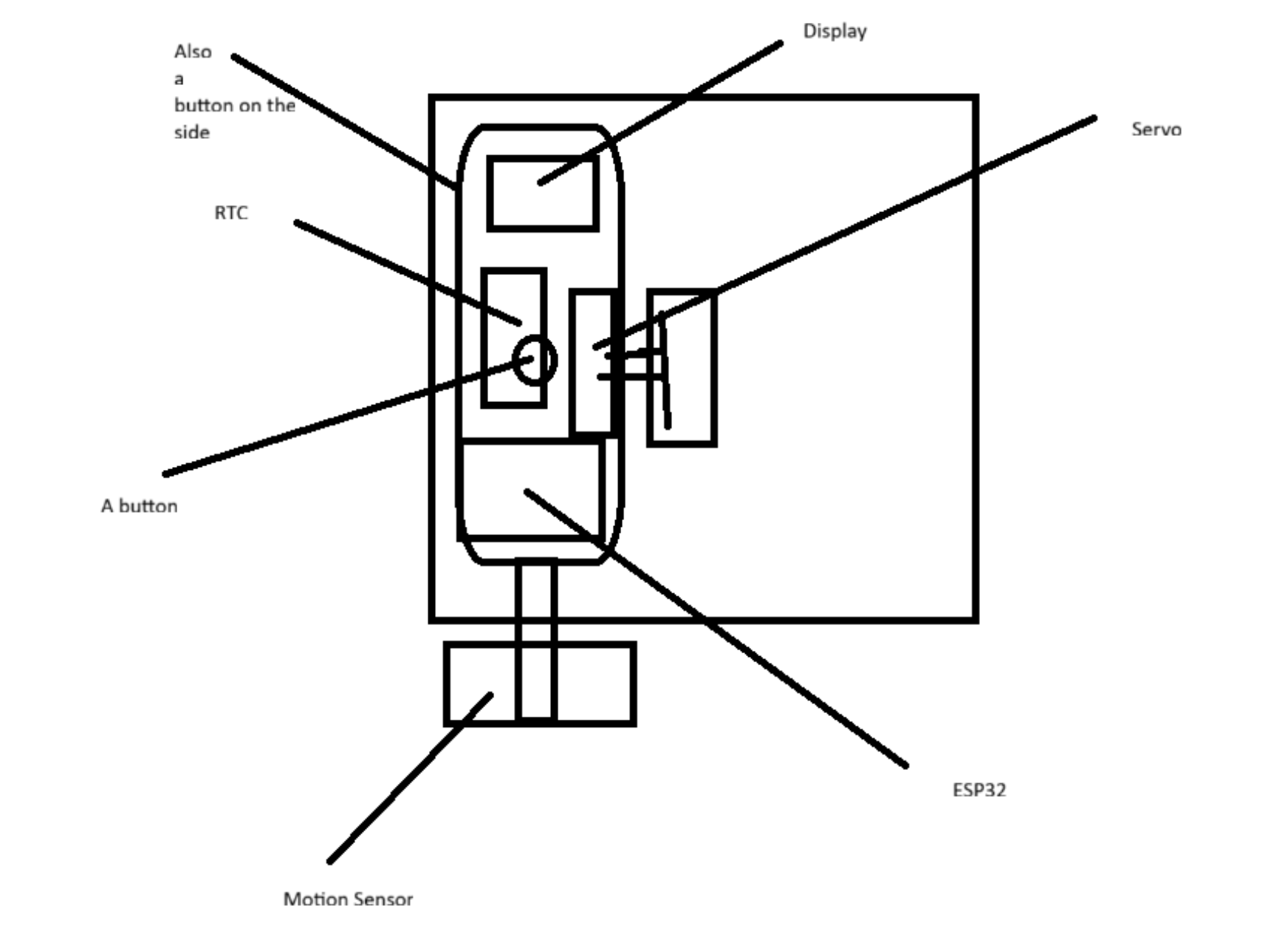
Initial plan drawings.

Initial plan drawings
FIG.02 · Initial plan drawings
§ 07 · STATE DIAGRAM edges = events · solid = action · dashed = timer

Every transition, on one page.

User event Timer / boot Default state Recovery state
§ 08 · RADAR PRESENCE DETECTION Radar setup

Sees you, even when you don't move.

Traditional motion sensors only detect active movement. The switch's radar scans across 9 distance zones and uses a custom filtering process to detect even the tiniest movements, like breathing, while filtering out motor noise.

Range4.2m
Gate07/9
Movement0.38
Static0.74

Uses a fast filter to capture immediate movements for an instant turn-on, and a slower filter to track micro-movements (like breathing) to keep the light on when you are sitting still. Both filters are designed to run efficiently on the small processor.

The sensor requires clear movement to turn the light on initially, preventing false triggers from drafty air or electronic noise. Once the light is on, the sensor becomes much more sensitive so it won't turn off while you are sitting still.

On startup, the system scans the room to measure background noise. Every 30 minutes when the room is empty, the sensor automatically recalibrates to adjust for environmental changes like temperature and humidity drift.

When the mechanical motor moves to toggle the light switch, the sensor temporarily pauses detection to ignore the physical movement and electrical noise. After a brief 2.5-second cooldown, it smoothly resumes monitoring.

§ 09 · HARDWARE & WIRING strapping pins avoided · 8 GPIOs in use

Every pin, accounted for.

ComponentModelGPIOProtocolFunction
ActuatorSG90 ServoGPIO 2PWMDual-arm switch toggle
Motion binaryLD2410C mmWaveGPIO 14Digital InHardware presence signal
Radar RXLD2410C UART RXGPIO 20UART @ 256kTelemetry & config
Radar TXLD2410C UART TXGPIO 0UART @ 256kTelemetry & config
Touch (action)TTP223GPIO 3Digital InToggle / single tap
Touch (menu)TTP223GPIO 1Digital InMenu / calibration
Display SDASSD1306 128×64GPIO 21I²C @ 400kOLED data line
Display SCLSSD1306 128×64GPIO 22I²C @ 400kOLED clock line

Strapping pins 8 & 9 (boot mode / log output), 4–7 and 15 (JTAG / flash SPI), 18–19 (USB-JTAG) all left floating to keep boot deterministic.

§ 10 · SLEEP ANALYTICS Local sleep analysis

Personal sleep analytics, on a microcontroller.

Every morning, the switch calculates a sleep quality score based on four distinct measurements. All data is processed locally and never leaves the device.

0 / 100 composite · last night
40 % Duration Target of 8 hours, scoring sleep length on a balanced curve.
35 % Consistency Measures bedtime variation (aiming for less than 15 minutes of drift).
15 % Timing Measures sleep timing relative to an optimal 11:00 PM target.
10 % Sleep Cycles Tracks 90-minute sleep cycles to encourage waking up at a natural cycle boundary.
CIRCULAR MEAN

Bedtimes are mapped onto a circle so that times crossing midnight average correctly. Standard averages would incorrectly place 11:30 PM and 12:30 AM at noon.

θ ¯ = atan2 ( 1 N i = 1 N sin θ i , 1 N i = 1 N cos θ i )
DURATION SCORE

Calculates a sleep duration score centered on the target goal, encouraging optimal sleep length.

Score dur = 100 · e ( actual target ) 2 2 · 1.2 2
  • Sleep deficit tracking: Keeps a running tally of lost sleep over the last 7 days compared to your sleep goal.
  • Schedule shift detection: Warns when bedtime shifts by more than 1 hour between weekdays and weekends.
  • Sleep pattern analysis: Categorises sleep habits dynamically as Regular, Night Owl, Early Bird, or Irregular.
  • Bedtime suggestions: Suggests an optimal bedtime each evening based on wake times, sleep cycles, and average time to fall asleep.
§ 11 · BLIND AUTOMATIONS Smart integrations

Integrating your smart home devices.

The smart light switch shares room occupancy data with a companion blinds controller over the local network to manage comfort automatically.

01

Automatic Solar Control

When the motion sensor detects that the room has been empty for a set period, it sends a message over the local network to the companion blinds controller. The blinds then close automatically to keep out summer heat or trap warmth during winter. You can learn more about the blinds controller on its own portfolio page.

Triggerroom vacancy (mmWave sensor) Targetclose blinds (prevent heat/cold gain)
§ 12 · CONNECTIVITY Connections & APIs

Smart connectivity, with or without internet.

While Wi-Fi is the primary connection, the switch is fully capable of offline operation. If Wi-Fi drops, a backup Bluetooth mode enables easy setup and recovery.

Companion Web App

The companion web app

A custom web application — installable on your phone, tablet, or computer — serves as the main control panel. You can toggle the light, adjust modes, manage schedules, view sleep scores, and fine-tune sensor settings. It communicates locally over your home network, making it completely private and offline-capable.

BLE 5 + Wi-Fi 6

Setup & Recovery

Easily configure the device over Bluetooth on first startup. If Wi-Fi goes offline, a backup Bluetooth recovery mode activates automatically, allowing you to update credentials or check status without taking the device off the wall.

SinricPro

Smart Assistant Support

Control the switch with your voice using standard Alexa or Google Home commands via a secure cloud bridge, with no complicated setup required.

MQTT

Local Smart Home Integration

Sends status updates (light state, motion levels, sleep scores, and temperature) to your local home server and accepts remote commands for advanced custom automation.

REST

Weather Updates

Retrieves local sunrise, sunset, and temperature data to coordinate daylight savings and automation schedules. Time zones and daylight saving changes are handled locally after startup.

Planned

Self-Balancing Robot Integration (Planned)

A planned firmware update will pair the switch with the self-balancing desk robot over MQTT — using the robot as an auxiliary sensor to expand presence coverage into the rest of the room and forward voice commands. Topic schema is reserved; the integration ships in a later release.

§ 13 · WI-FI 6 TARGET WAKE TIME Wi-Fi 6 power scheduling

Saving energy with Wi-Fi 6.

The ESP32-C6 is one of the first hobbyist microcontrollers with native Wi-Fi 6. By using a feature called Target Wake Time (TWT), the switch schedules precise wake-up windows with your home router. The wireless radio sleeps in between, dramatically reducing power consumption.

70% Idle Power Saving Radio sleeps between planned wake windows
< 5ms Wake Latency Wakes instantly to process commands
App App Control Toggle TWT power saving on or off via the app

Standard Wi-Fi keeps the wireless antenna active constantly, wasting energy for a device that only needs to communicate occasionally. With TWT enabled, the switch and router agree on specific microsecond windows to transfer data, allowing the radio to sleep most of the time.

This feature is optional and can be toggled in the companion web app. If disabled, the radio remains active for absolute minimum latency. In everyday use, keeping power saving enabled provides instant responses while reducing heat and saving energy.

§ 14 · SAFETY & RELIABILITY System fail-safes

Engineered for absolute safety and reliability.

15s

Protective startup delay

The motor is disabled for the first 15 seconds after booting while the power supply fully stabilizes. This prevents sudden power drops from resetting the device.

2×

Mirrored storage backup

Settings are saved in two separate memory slots with verification checksums. If a power cut occurs during a save, the device automatically restores your settings from the backup slot on startup.

3

Automatic safe mode

If the device experiences 3 consecutive unexpected restarts, it pauses the motor, Wi-Fi, and sensor, displaying a warning on the screen. It automatically attempts a normal recovery after 10 minutes.

Automatic software rollback

New updates are only permanently saved after the device successfully starts up and connects to the network. If an update fails or causes a crash, it automatically reverts to the previous working version.

EEPROM dual-slot mirror
SLOT A · primary magic · payload · CRC32 SLOT B · backup magic · payload · CRC32 WRITE FLAG active during write

If the primary settings slot fails validation on startup, the device automatically loads the backup settings.

§ 15 · FUTURE UPDATES Roadmap

Self-Balancing Robot Integration

A future software update will connect the switch with the self-balancing desk robot. This will allow you to use the robot's voice command system to toggle the lights or check your sleep stats without opening the app.

Connecting both devices over your home network will also allow the robot to serve as an extra motion sensor, helping to cover blind spots and coordinate automations across your entire room.

§ 16 · REMOTE CONTROL Zaylo companion app integration

Interactive Companion Dashboard.

Manage all devices, view sleep quality scores, and configure mmWave radar parameters remotely.

// LIVE ECOSYSTEM LINK

Zaylo Remote Dashboard Emulator

The physical Smart Light Switch controller integrates seamlessly with the **Zaylo Remote** application over sub-100ms MQTT WebSockets. Explore the companion app interface, test the live light relay toggles, and interact with the physical presence radar simulation directly in our high-fidelity web emulator.

Launch Interactive App Emulator
← back to index
SYSONLINE
SECTION
SCROLL000%
BUILDv0.1 / 2026
LOCAL